
Open Google Maps in mainland China, and it looks fine at first. The map loads, your blue dot is there, streets have names. Then you tap for directions, and everything is off — the wrong street, a building that isn’t there, a route that doesn’t match what’s in front of you. This is not a bug. It is how every legal map service in China is required to work.
This guide is research-based, with details from my own trips woven in where they apply. I have made 8 trips to mainland China since December 2024, to Shanghai, Guangzhou, Shenzhen, Hangzhou, Wuhan, Suzhou, Nanjing, and Xi’an. I carry an iPhone, and I have used the Chinese-language version of Amap (高德地图) throughout.
- Quick answer
- Why Google Maps doesn’t work here
- If you have an iPhone: Apple Maps
- Amap
- Baidu Maps — the fallback if you have no Chinese number
- If you want full login features, get a number after you land
- None of this works without a data connection
- Who this fits, and who should look elsewhere
- Sources checked (as of July 2026)
Quick answer
- Google Maps: locations are shifted, often by 100 to 700 meters, and Google’s own services are blocked inside mainland China anyway. Don’t plan a route with it.
- iPhone users: Apple Maps switches to Chinese map data automatically once your device is in China. No setup needed.
- Want the most complete map, and can read Chinese or don’t mind a Chinese interface: Amap (高德地图) is what most people in China actually use. Its sign-up screen only accepts a phone number from mainland China, Hong Kong, Macau, or Taiwan — no other country code is selectable — and the login behavior itself isn’t consistent.
- Can’t read Chinese and want an English interface: AMap Global is a real, separate app, but the reviews are mixed. Treat it as a backup, not a guarantee.
- No Chinese phone number at all: basic navigation on Baidu Maps reportedly works as a guest, without logging in, which sidesteps the number problem. The interface stays in Chinese either way.
Why Google Maps doesn’t work here
China’s Surveying and Mapping Law requires every digital map operating inside the country to use a coordinate system called GCJ-02, not the WGS-84 system that Google Maps and most of the world use outside China. GCJ-02 adds a deliberate, location-dependent offset of roughly 100 to 700 meters to every coordinate, for national security reasons. As of July 2026, this requirement is still in force, and it applies to any map service operating on the ground in China, foreign or domestic.
On top of that, Google’s own services are blocked inside mainland China, which is a separate problem from the coordinate offset. A VPN can get you back onto Google’s servers, but it does not fix the coordinate system. Even with a working VPN, Google Maps in China will still place you on the wrong side of the street.
If you have an iPhone: Apple Maps
Apple Maps switches its data source automatically once your iPhone is in mainland China. The underlying map data comes from AutoNavi, the same company behind Amap, and this arrangement has been in place since Apple’s mapping service launched with iOS 6 in 2012. The interface stays in English, and there is nothing to configure. It happens on its own.
I have not tested this myself. All 8 of my trips were on the Chinese-language version of Amap, so I can’t say how Apple Maps handles route search, transit directions, or Chinese place names in practice. If you have an iPhone and want the simplest starting point, it’s worth trying, just don’t take my word for how well it performs. I haven’t used it.
Amap
There are two versions.
Amap (高德地图) — what I actually use
Amap is the map I have used on every one of my 8 trips. As a Japanese, I read Chinese, so I have always used the standard Chinese-language version, not an English one. For anyone who reads Chinese, or is willing to work around a Chinese interface with occasional translation, this is the most complete map available in the country: walking and transit directions, ride-hailing built in, place data that stays current, and even movie tickets bookable from a link inside the app.
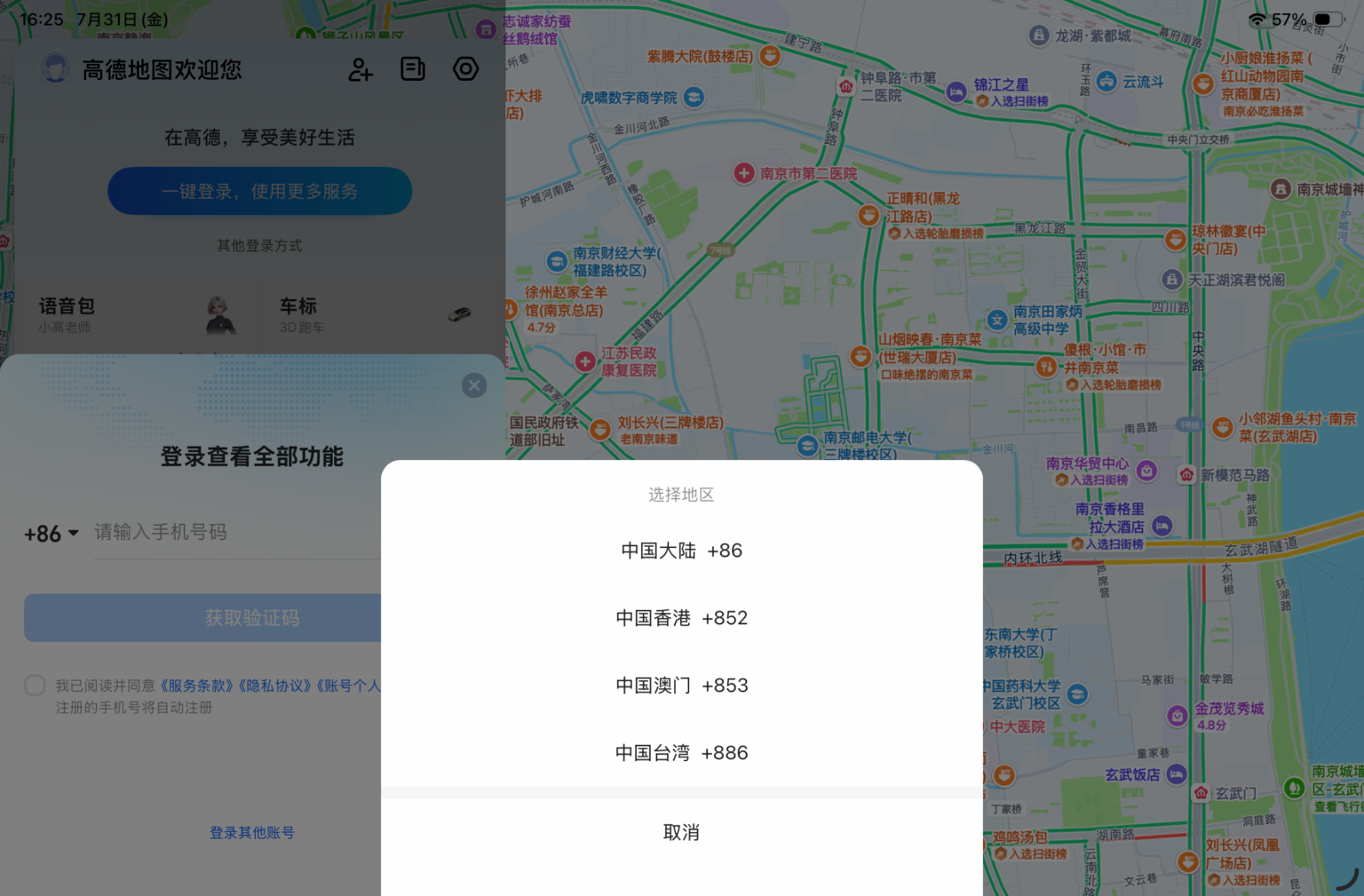
Amap’s sign-up screen only offers a region code from mainland China (+86), Hong Kong (+852), Macau (+853), or Taiwan (+886). There is no option for any other country code, so a phone number from outside Greater China cannot be entered at all.

I carry a Hong Kong-China dual-number SIM, and I have only ever logged in with the mainland China side of it, not the Hong Kong number. Even with that number, my account gets logged out often, and I haven’t found a pattern for when or why. The login requirement itself also seems to shift: on some trips I’ve had to log in before doing anything, and on others basic route search has worked without logging in at all. I would not count on either behavior holding for you.
If you don’t read Chinese, this app is a real barrier, not a small inconvenience. That’s where AMap Global comes in.
AMap Global — the English version, with caveats
AMap Global is a separate app listing from AutoNavi, built specifically for English-speaking visitors, and as of July 2026 it is actively maintained, with an update as recent as this month. On the App Store, the average rating sits high, in the range of 4.7 out of 5 across tens of thousands of reviews.
The reviews are not uniformly positive, though. A number of long-term foreign residents describe the English interface working for years and then abruptly reverting to Chinese-only, with no way to switch it back. Whether that happens seems to depend on region, device, and which version is installed. I have not used this app myself, so I can’t tell you which side of that split you’ll land on. Try it before you fly, and keep Amap’s Chinese version or Apple Maps as a fallback.
Baidu Maps — the fallback if you have no Chinese number
Baidu Maps has strong public transit data and detailed local listings, but its English support is thin, and searching in English often returns limited or no results.
Its one real advantage over Amap: basic route search and navigation reportedly work as a guest, without logging in at all, which sidesteps the phone-number problem entirely. Unlike Amap, Baidu’s own sign-up screen doesn’t show a country-code selector at all, which suggests the field is built around Chinese numbers by default, though I have not set up an account to confirm this.

Reports on registering from outside China are mixed either way, with some describing international numbers being rejected outright. If you have no Chinese number and just need to get from A to B, guest mode is worth trying before you assume you’re stuck. If you do read Chinese, or don’t mind a Chinese-only interface, Amap remains the more complete option.
If you want full login features, get a number after you land
My own mainland number comes from a Hong Kong dual-number SIM I’ve held for years; that specific product is no longer sold to new customers. For most readers, the realistic path to a number either app will accept is a tourist SIM bought after arrival, at an airport counter or a China Mobile, China Unicom, or China Telecom store, with your passport used for the required registration.
The one airport counter I checked myself, at Pudong, I don’t remember so much but I remember I felt it was high, which is why I never followed up and can’t say what plan that price covered. Prices vary by airport and counter, so it’s worth checking on the spot rather than assuming either figure.
It’s an extra errand on day one, though, and probably not worth it just for maps. Guest mode on Baidu and the parts of Amap that work without logging in already cover basic navigation. I would only go this route if I already needed a local SIM for something else, like calls or a Chinese app that requires SMS verification.
None of this works without a data connection
Every app above needs mobile data or Wi-Fi to do anything useful. If you haven’t sorted out internet access in China yet, that’s a separate decision. I’ve written about that in China: How to Climb Over the Great Firewall of China.
Who this fits, and who should look elsewhere
If you have an iPhone and want the least setup, start with Apple Maps and see how far it gets you. If you read Chinese, or don’t mind switching between two apps, Amap in Chinese is more complete than anything else here, though don’t be surprised if it logs you out or asks to log in at inconsistent moments.
If you don’t read Chinese and want a single English app you can rely on completely, none of the options above are a sure thing yet. AMap Global is the closest fit for that. If you don’t have a Chinese phone number at all, Baidu Maps in guest mode is the fallback worth trying before you assume you’re stuck.
Sources checked (as of July 2026)
- Restrictions on geographic data in China — Wikipedia